Print/Convert
With the ATR CustomTools Print/Convert feature you can:
- Print your SOLIDWORKS drawings using your custom Printing Profiles that are able to map different sheet sizes and formats to specific physical printers.
- Convert your SOLIDWORKS models and drawings into secondary file formats, like PDF, STEP, IGES, DXF, DWG, and many more; using various Batch File Conversion Rules with advanced options.
- Create Cutting Profile Sheets and Bends Sheets for your Sheet Metal Drawings.
- Batch change/update sheet formats of existing SOLIDWORKS drawings using Sheet Format Actions.
- Create SOLIDWORKS drawings automatically for SOLIDWORKS models using various Drawing Creation Rules.
All the various rules of the above categories can each be very accurately targeted to specific groups of SOLIDWORKS models or drawings, using File Selection Filters.
In addition, all rule selections can be saved into multiple Batch Operation Templates, which can also be used as custom actions via Quick Launch. See examples below.
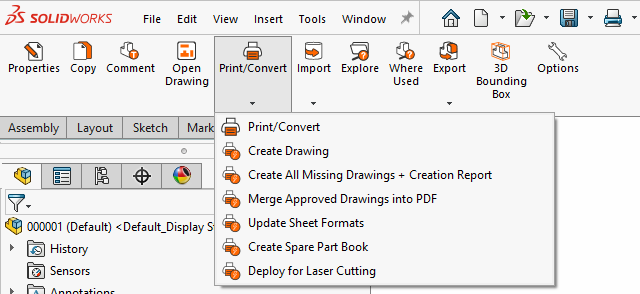
Batch Operation Template Quick Launch Examples
Use the following Profile Options to set up the rules for the ATR CustomTools batch operations:
- Print Properties
- File Conversion
- Drawing Creation Rules
- Sheet Format Actions
- Cutting Profile Sheet
- Bending Sheet
In SOLIDWORKS, click the
 icon in the ATR CustomTools toolbar or click Tools, ATR CustomTools, Print/Convert.
In ATR CustomTools Viewer, click the Print command located in the ATR CustomTools Tools group of the ribbon.
The Batch Operation dialog box appears.