Solid Edge Conversion Options
The Solid Edge Conversion Options are used to set up the conversion operation that allows you to migrate your existing Solid Edge files and materials with SOLIDWORKS by converting them to the SOLIDWORKS format.
The material mapping allows you to migrate your Solid Edge materials with the SOLIDWORKS materials.
| Enable material mapping | Select this option to enable the material migration during the conversion process. |
| Add mapping | Adds a new material mapping. The new material mapping row appears in the material mapping table. |
| Remove mapping | Deletes the selected material mapping from the conversion. |
The desired Solid Edge materials you want to migrate with the SOLIDWORKS materials are selected in the material mapping table.
| Solid Edge Material | Type here the Solid Edge material name you want to migrate. |
| SOLIDWORKS Material | Select here the SOLIDWORKS material which you want to migrate the Solid Edge material with. |
The transformation rules are used to make the desired changes to the output path(s) of the converted files. If you want to convert the Solid Edge files to a different location than the source files, you can change parts of the output path(s) or even the whole path(s) if necessary.
| Add Rule | Adds a new transformation rule. |
| Remove Rule | Removes the selected transformation rule. Select the desired transformation rule from the associated rules list and click the Remove Rule button to delete the transformation rule selected from the list. |
| Find What | A string to be looked for from the file path. Type here the string you want to replace with another one in the target path of the Solid Edge file conversion output file(s). |
| Replace With | A replacement string for the search string defined in the Find What column. Type here the string you wish to replace the string you have defined in the Find What column with. |
The output filename cannot be changed with the transformation rules. You can rename the converted files once you have converted them by using for example ATR CustomTools Properties or Copy feature.
The Drawing Options are used to select the output format to convert the Solid Edge drawings to.
| Convert drawings to the Adobe PDF format. | |
| Dxf | Convert drawings to the DXF format. |
| Dwg | Convert drawings to the DWG format. |
The model templates are used to replace a template currently used by the Solid Edge file with the SOLIDWORKS document template.
| Part template | Type here the SOLIDWORKS part template name you want to replace the Solid Edge file template with. |
| Assembly template | Type here the SOLIDWORKS assembly template name you want to replace the Solid Edge file template with. |
 buttons associated with the
Part template and Assembly template boxes to browse for the SOLIDWORKS document templates to
be used on the Solid Edge file conversion.
buttons associated with the
Part template and Assembly template boxes to browse for the SOLIDWORKS document templates to
be used on the Solid Edge file conversion.
| Exclude SE Properties | Type here the Solid Edge Property names you want to exclude from the conversion. To exclude multiple properties, use a semicolon (;) as a separator between the property names. |
Use the Save file source property as options to determine the level where the source document properties are stored in the Solid Edge file conversion output documents.
| Document properties | Select this option to store the source document properties at the document properties level in the output document. |
| Configuration specific properties | Select this option to store the source document properties at the configuration specific properties in the output document. |
Use the following instructions to convert all sheets included in the Solid Edge dft file into a SOLIDWORKS file the dft is converted to:
- Open the desired dft file in Solid Edge.
- Perform the Save As command on the dft file in Solid Edge.
- Select PDF as the format to save the file in and then click Options.
- In the PDF Export Options, select the All sheets option.
- Finish the saving operation on the dft file in Solid Edge to save changes made in the previous steps to the Solid Edge PDF Export Options.
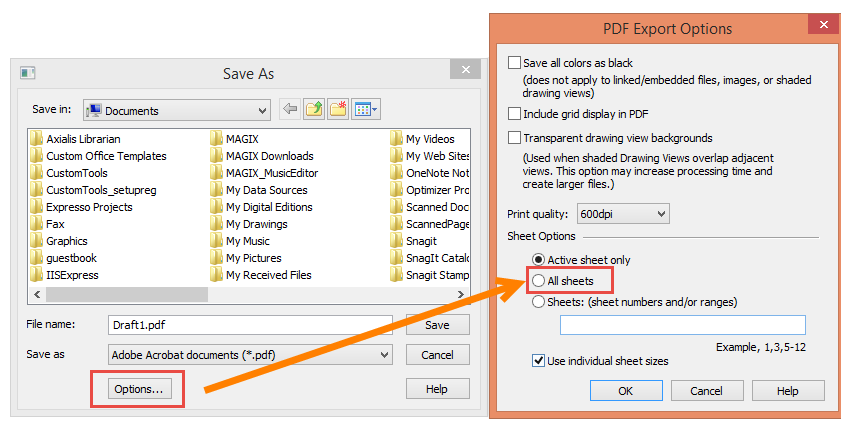
Showcasing the Solid Edge PDF Export Options dialog box.