The List Feature
The List feature appears as a menu in the ATR CustomTools Command bar associated with the following ATR CustomTools features:
- Export
- Print/Convert
- Search Results
- Where Used
The List menu in the command bar provides the following commands:
| Command Name | Description |
|---|---|
| Export |
Export the document list into an external file for later use. The following file types are supported:
|
| Open as CSV | Open the document list in the default application assigned for CSV files on your workstation. |
When you open the document list using Open as CSV, the document structure is formatted as follows:
| Item | Level Identifier |
|---|---|
| Structure Name | 1 |
| SOLIDWORKS Assembly | 2 |
| SOLIDWORKS Part | 3 |
| SOLIDWORKS Drawing | -1 |
| SOLIDWORKS Drawing Sheet | -2 |
In the following image, you can see an example structure list opened as CSV in Microsoft Excel using the List menu's Open as CSV command from the ATR CustomTools Batch Operation dialog box. The leftmost column in Excel represents the document's level in the structure by the Level Identifiers described in the table above.
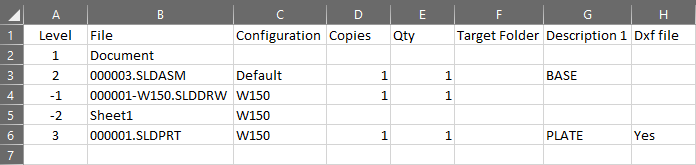
SOLIDWORKS Assembly's structure list opened from the ATR CustomTools Batch Operation dialog box, as CSV in Microsoft Excel.