Bend Sheet
With the Bend Sheet feature, you can add a new sheet to your SOLIDWORKS drawing which has all the bends marked in the model's flat view with the bend direction and dimensions.
The following drawing sheet features and operations are applied to the sheets generated by the ATR CustomTools Bend Sheet feature:
- Sheet scale. ATR CustomTools Bend Sheet feature generates the Bend Sheets always using the 1:1 scale.
- View Orientation. ATR CustomTools Bend Sheet feature generates the Bend Sheets using the default view of the first drawing sheet or the selected drawing view as the reference.
- Display Style. Views in the Bend Sheet are generated using the Hidden Lines Removed display style. However, the style is not locked, so you may change the Display Style for the desired views if needed.
- Annotations. Annotations to introduce the bends are added to the drawing view in association with the bend lines.
- View Order. Views in the output sheet are ordered so that the views in the output sheet are not interleaved.
The flat view in a drawing's Bend Sheet created by the Bend Sheet references the SMFlatPattern model configuration. The SMFlatPattern model configuration is created automatically in the drawing's referenced model if it does not already exist. For that reason, the referenced model should be saved before running the Bend Sheet command against the drawing.
Because of the new configuration creation in the referenced models, the models processed by the Bend Sheet operation are opened during the process and become unsaved. The unsaved models are left open after the operation to indicate to the user to save the unsaved changes. If the referenced models are already open during the Bend Sheet process, they are just left open to indicate the user to save the unsaved changes. In these cases, the unsaved changes are the new configurations created by ATR CustomTools.
The following pictures describe how the Bend Sheet works in practice:
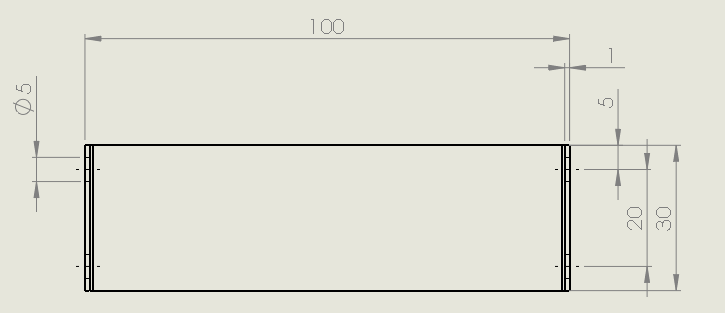
This picture represents a measuring sheet of the drawing created from a bent sheet metal plate which has holes on the bent sides.
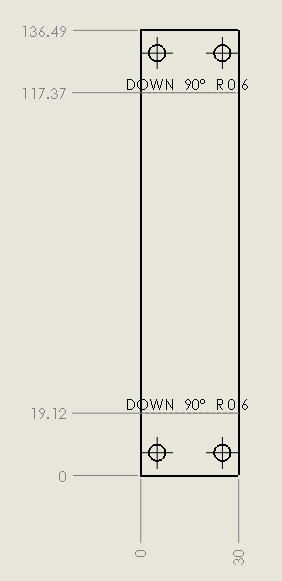
This picture is taken from a Bend Sheet generated by the ATR CustomTools Bend Sheet feature.
While performing the Bend Sheet command against a drawing that already has a sheet created by the Bend Sheet feature, you are prompted whether you want to append or overwrite the existing sheet.
| Append | Appends the existing sheet by adding another instance of the part into the existing sheet created by the Bend Sheet. |
| Overwrite | Creates a new sheet to be used with the bend machine by replacing the existing sheet with a new one created by the Bend Sheet feature. |
| Cancel | Cancels the Bend Sheet action. The bend sheet is not created and the existing DXF sheet is not removed if the operation is cancelled. |
Drawing sheets generated by the ATR CustomTools Bend Sheet feature are not intended to be modified by the user. The sheet that was active when the Bend Sheet operation was started is left as the active sheet once the operation is finished.
Multibody parts are not supported by the ATR CustomTools Bend Sheet feature. To make DXF files with the bend views from your multibody parts, you can use the ATR CustomTools Print/Convert feature in the File Conversion mode.