Property Functions
Use functions on Property to store various kinds of dynamic data into a property.
The Property functions are separated into the following groups based on the function type:
| Before function | The function is performed automatically when the Property pane is opened. |
| After function | The action defined in the after function is performed after a Property value has been defined. |
| Button function | Defines the function of the button that will be used with the Property. |
| Data Function | Defines the function of the dynamic data stored into a Property. Data function handles the data in relation with the data of Property. See the Data Function Usage Example section from this page. |
| Property Scopes | Property Types | ||||||||||
|---|---|---|---|---|---|---|---|---|---|---|---|
| Function name | Description | Model | Part | Assembly | Drawing | Version | Cut-List | Combobox | Editable Combobox | Editbox | Date |
| GetCurrentDate | Insert the current date into the custom property. | • | • | • | • | • | • | • | |||
| GetCombinations | Retrieves the available combinations into the combobox property. | • | • | • | • | • | • | • | |||
| GetMaterials | Inserts the SOLIDWORKS materials into the combobox list. | • | • | • | • | ||||||
| GetMass | Gets the total weight of the assembly components to the property. | • | • | • | • | ||||||
| GetUserInitials | Gets the initials of the ATR CustomTools database user that is currently logged in. | • | • | • | • | • | • | • | • | ||
| Property Scopes | Property Types | ||||||||||
|---|---|---|---|---|---|---|---|---|---|---|---|
| Function name | Description | Model | Part | Assembly | Drawing | Version | Cut-List | Combobox | Editable Combobox | Editbox | Date |
| SetColor | Sets the color for the part. The current color of the part is overwritten by the selected color. | • | • | • | • | • | |||||
| SetDensity | Sets the density based on the selected material. | • | • | ||||||||
| Property Scopes | Property Types | ||||||||||
|---|---|---|---|---|---|---|---|---|---|---|---|
| Function name | Description | Model | Part | Assembly | Drawing | Version | Cut-List | Combobox | Editable Combobox | Editbox | Date |
| GetCode |
Generates a document code based on your own sequences. The
 button associated to the property
opens the New Code dialog box. button associated to the property
opens the New Code dialog box.
|
• | • | • | • | • | • | ||||
| GetColor | Selects a color from your list of customized color. | • | • | • | • | • | |||||
| GetDatabaseItem |
Search the desired value an external data source and establish a link between the Property and
the desired value retrieved from the external data source.
NOTE:
The GetDatabaseItem button function is available for the Editable combobox properties
only on the Properties that scope is Part.
|
• | • | • | • | • | • | • | |||
| GetRALColor |
Selects a color from your list of RAL color. The
 button associated to the
property opens the Custom Colors dialog box used to select the desired RAL color. button associated to the
property opens the Custom Colors dialog box used to select the desired RAL color.
|
• | • | • | • | • | |||||
| OpenDictionary | Opens the dictionary based on the default language selected in the general user options. | • | • | • | • | • | • | ||||
| Revisions |
Opens the component's revision table. The
 button associated
to the property opens the Revisions dialog box used to fill in the revision data of the selected
component. button associated
to the property opens the Revisions dialog box used to fill in the revision data of the selected
component.
|
• | • | • | • | • | • | ||||
| SetEntityData | Store the desired data for the Custom Entity Property. | • | • | • | • | • | |||||
| Property Scopes | Property Types | ||||||||||
|---|---|---|---|---|---|---|---|---|---|---|---|
| Function name | Description | Model | Part | Assembly | Drawing | Version | Cut-List | Combobox | Editable Combobox | Editbox | Date |
| GetCombinationValue | Get value to the Property from the combination selected in the Combination box. | • | • | • | • | • | • | • | |||
| GetListKeyValue | Get the key value selected in the Value from box from the Lookup list based Property selected in the Source property box. | • | • | • | • | • | • | • | |||
| GetParentItem | Get value from the parent document's Property selected in the Source Property box. | • | • | • | • | • | |||||
| GetTranslation | Get translation of a dictionary based multilingual Property selected in the Source Property box in a language selected in the Target language box. Source properties available in the Source property box have the OpenDictionary selected as the Button function. | • | • | • | • | • | • | • | |||
| Dictionary | Use the Dictionary box to determine a dictionary used by the Property which has OpenDictionary selected as the Button function. |
| Target language | Select the target language to translate the custom property selected in the Source property box of a Property which has GetTranslation selected as the Data function. |
| Source property | Select the Property used as the source of the value linked to another property. |
| Combination | Use the Combination box to determine the combination used to retrieve the value to a custom property which has GetCombinationValue selected as the Data function. |
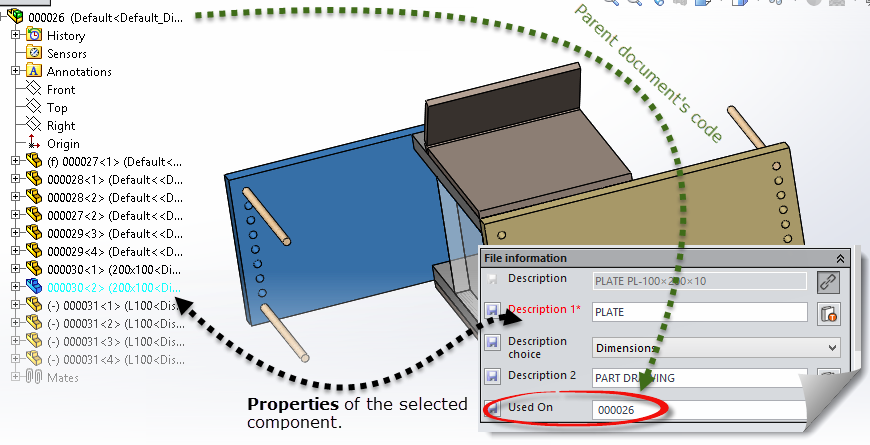
The GetParentItem data function's idea is to allow the user to get the desired Property value from the model it is a part of.
For Example: Let's say we have a Property labelled as Used On. The property is scoped to the Model documents and the property also have the GetParentItem data function in use in association with a model property called Drawing No which is used to write the model document's code into.
Then, we have a part called 000030.sldprt which belongs to an assembly called 000026.sldasm like shown in the following picture. In this case the Used On property in component 000030.sldprt gets value 000026 based on value in its parent document's (000026.sldasm) property called Drawing No.
Use GetTranslation as the Data function to retrieve a translation in the language selected in the Target language box, based on the dictionary-based property selected in the Source property box.
Use the Target language box to select the language in which to retrieve the source property's value.
The Source property box is used to select the dictionary-based Property to be translated into the target language selected in the Target language box.
The Source property sets the desired combined property as a source of value for the custom property. The GetCombinationValue must be selected from the Data function.
You can insert Properties as new columns into the BOM (Bill of Materials) of the SOLIDWORKS drawing created from the model document. Please see the SOLIDWORKS help about the Bill of materials for the further information.
The general controls are included in all pages of the Property Wizard.
| Back | Return to the previous page of the Property Wizard. |
| Next | Proceed to the next page of the Property Wizard. |
| Finish | Save the property and close the Property Wizard. |