ATR CustomTools Environment
The following figure describes an example ATR CustomTools environment model.
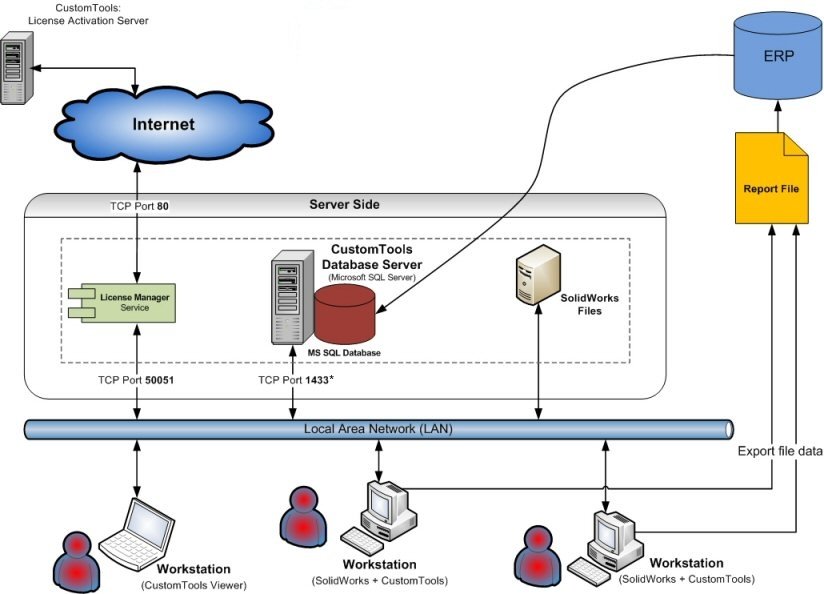
ATR CustomTools Environment Diagram
| Server Side |
Part of the ATR CustomTools environment that contains all necessary server-side components. All components can be installed on one server machine.
|
||||||
| License Activation Server | Server machine on the ATR CustomTools manufacturer side used to activate/transfer purchased licenses. | ||||||
| Internet | ATR CustomTools licenses are activated via the internet. | ||||||
| Local Area Network (LAN) | Workstations and servers are usually connected using a local area network. | ||||||
| ERP | The ERP can be used to retrieve custom property values. You can also export various reports such as BOM or part/assembly structure information into the ERP system. | ||||||
| Report File | The document structure is exported into an external system using a report file containing all exported data. The report file is in a format supported by the target system. Use the Export command with the SOLIDWORKS Add-in to export custom reports. |
* Microsoft SQL Server uses dynamic TCP port configuration by default. The port number could be any available TCP port number. However, the SQL Server TCP port number is usually 1433 by default in environments with only one SQL Server instance. In environments with more than one SQL Server instance, the TCP port number could be different.
You can set a static port for SQL Server using the SQL Server Configuration Manager. For further instructions, see the SQL Server Installation topic.