Bi-Directional Link to Microsoft Excel
In this tutorial, you have two main objectives:
- Add an external data source connection to Microsoft Excel using the ATR CustomTools Administration.
- Create a Property whose value is linked to an external data source. In this case, you use a Microsoft Excel workbook as the data source.
During this tutorial, you will use the following features of ATR CustomTools:
- ATR CustomTools Administration Tool: Used to create a link between the ATR CustomTools database and the Microsoft Excel workbook.
- Attributes: Link between properties and SOLIDWORKS document properties.
- Database Search Groups: Profile-specific options used to set up links to an external database to retrieve custom property values.
- Property Wizard: Wizard to create and edit custom properties.
You will need a Microsoft Excel workbook for this tutorial. Create an Excel workbook as shown below and put all the contents into Sheet1 of the workbook.
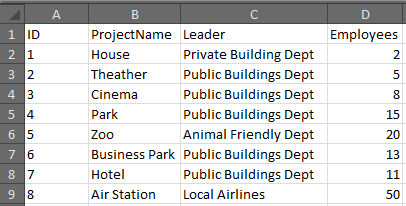
Excel workbook needed in this tutorial.