Coord Note
The Coord Note is a drawing-related feature of ATR CustomTools which can be used to add coordinate point annotations to drawing views. The coordinates can be used, for example, to guide a cutting device to cut complex shapes from a sheet metal plate.
You can insert Coord Note annotations into the selected view of the drawing. A message box appears when inserting a Coord Note annotation into a view other than the one selected, to prevent insertion into the wrong view. To insert Coord Note annotations to another view, end the current Coord Note session, select the desired view, and start Coord Note again.
If you do not have any drawing view selected when you start the Coord Note session, then the first view inserted into the drawing is considered as the selected view.
If your model shape has, for example, some rounded corners, you can mark the arc coordinate points with the help of the Coord Note feature. In that case, the Coord Note annotation line snaps onto the arc line, but the annotation itself includes the coordinates of the arc's center.
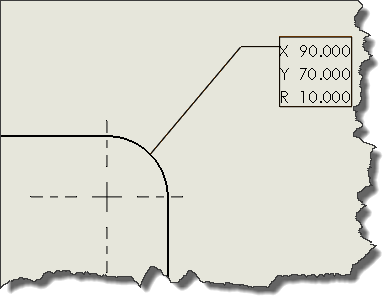
Coordinates in the Coord Note annotation attached to a point located on the arc line refer to the arc's center and also indicate the arc radius.
If your model shape has holes that could be cut using a cutting device, you can mark the hole centers' coordinate points with the help of the Coord Note feature. In that case, the Coord Note annotation line snaps onto the hole's circle, but the annotation itself includes the coordinates of the hole center.
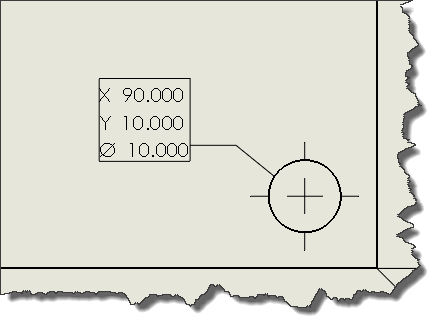
Coordinates in the Coord Note annotation attached to a point located on the hole's circle refer to the circle's center and also indicate the circle's diameter.
 |
Ends the Coord Note session and saves the coordinate boxes added during the current session. |
 |
Cancels the Coord Note execution and undoes all the changes made during the current session. |
 |
Linear coordinates | Use the linear coordinate scheme. |
 |
Polar coordinates | Use the polar coordinate scheme. |
 |
Reverse XY | Inverts the X and Y axes. |
| Group selections | Select the coordinate group. | |
| Create new group | Creates a new coordinate group. | |
 |
Custom origin |
Assign a custom origin for the coordinates. The origin is the place where the coordinates are X=0 and Y=0. Coordinates of all points marked after the origin point are calculated from the origin location.
TIP:
You can assign the custom origin point to the intersection of two edges. Click the
Custom origin button and then click the desired two edges to assign the origin point to their
intersection.
|
| Note angle in Degrees | Determines the angle of the coordinate boxes. The angle is measured from the note line to the coordinate box edge. |
| Create notes - Start | Start adding the coordinate boxes into the drawing. |
| Create notes - Stop | Stop adding the coordinate boxes into the drawing. |
| Layer | Determines the layer to be used to format the coordinate boxes. |
| Notes in group | Shows a list of the notes in the selected coordinate group. |
| Group notes | Adds the selected notes into a group. |